
Close Menu
    Facebook X (Twitter) Instagram
    Trending
    • Ogor Mawtribes Gain Powerful New Rules in Upcoming Warhammer Age of Sigmar Battletome
    • Excel World Championship Goes Global as Competitors Tackle Puzzles in the Open Air
    • South East Water Ordered to Fund £30.5 Million Improvement Programme Following Major Supply Failures
    • Adobe Expands User Control Over AI Tools in Lightroom and Photoshop
    • Monitor Audio Radius Series 4G Launches With Ambitions to Redefine Compact Hi-Fi Sound
    • Anthropic to Hold White House Talks After AI Tool Suspension
    • Rayman Legends Retold Confirmed For October Release On Xbox Series X|S
    • Microsoft Tests AI Wearable Devices Designed for Office Workers
    Mediarun Search
    • Home
    • Top News
    • World
    • Economy
    • Science
    • Technology
    • Sport
    • Entertainment
    • Contact Us
    Mediarun Search
    Home»Tech»We tested a camera that prints photos from your cell phone
    Tech

    We tested a camera that prints photos from your cell phone

    Edward LangleyBy Edward LangleyApril 5, 2024No Comments2 Mins Read
    Facebook Twitter Pinterest LinkedIn Tumblr Email
    We tested a camera that prints photos from your cell phone
    Share
    Facebook Twitter LinkedIn Pinterest Email

    What's good about it?

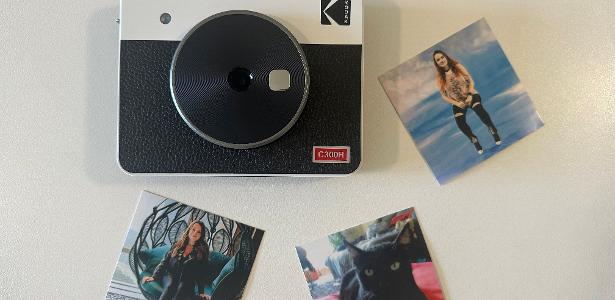
    Differentiated printing. It uses sublimation technology, which creates one color after another. The paper goes in and out five times (once for preparation, three for yellow, cyan, and red, and another for final lamination). This ensures a vivid and highly durable image (resists water, dust and finger touch). It doesn't need to be “shaken” like a Polaroid, because it comes out ready and dry. The Mini Shot 3 prints in a nice rectangular format (5.3cm x 8.6cm), while the Mini Shot 2 prints square images (7.6cm x 7.6cm).

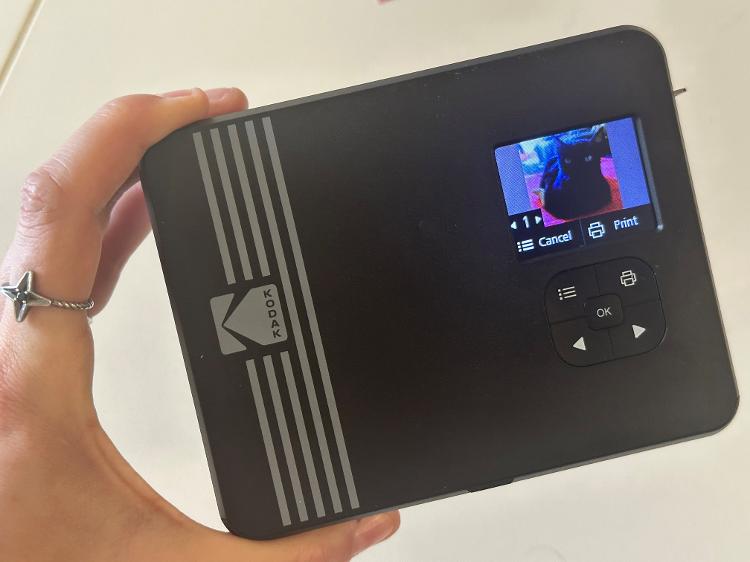
    LED screen. Although it is very small (1.77 inches), the screen is used to scan the image before printing – a possibility that other instant cameras do not offer. It also allows you to apply effects to the photo, such as filters and borders, or ignore it if you'd rather take another photo.
    picture
    Photo: Marcela Duarte/UOL

    Bluetooth printing. When you download the Kodak Photo app and pair your camera with your cell phone, it becomes a printer for any photos stored on it. Through the app, there are more editing possibilities, such as resizing, creating labels, and adding stickers and text. It works on Android and iPhone.

    Good quality pictures. The camera sensor is 10MP, which is very satisfactory for an instant camera, which prints images with a certain retro feel. Naturally, a cell phone camera has a higher resolution, so photos printed via Bluetooth will be of higher quality.

    Edward Langley

    Edward Langley is a contributor at Mediarunsearch.co.uk, covering a wide range of topics including news, politics, business, technology, sport, entertainment and lifestyle. He focuses on delivering clear, balanced reporting and useful information that helps readers stay informed about current affairs and developing stories. His work highlights issues, trends and events that matter to everyday audiences, with an emphasis on accuracy, relevance and accessible journalism.

    See also  Windows 11: Microsoft updates integrated applications
    Share. Facebook Twitter Pinterest LinkedIn Tumblr Email

    Related Posts

    Excel World Championship Goes Global as Competitors Tackle Puzzles in the Open Air

    July 14, 2026

    Adobe Expands User Control Over AI Tools in Lightroom and Photoshop

    June 16, 2026

    Monitor Audio Radius Series 4G Launches With Ambitions to Redefine Compact Hi-Fi Sound

    June 16, 2026
    Leave A Reply Cancel Reply

    Navigate
    • Home
    • Top News
    • World
    • Economy
    • Science
    • Technology
    • Sport
    • Entertainment
    • Contact Us
    Pages
    • About Us
    • Contact Us
    • DMCA
    • Editorial Policy
    • Privacy Policy
    © 2026 Media Run Search. All Rights Reserved. Designed by Media Run Search.

    Type above and press Enter to search. Press Esc to cancel.